Showing posts with label 6. Show all posts

Friday, September 29, 2017

RPP IPA SD Kelas 6

RPP IPA SD Kelas 6


Rencana Pelaksanaan Pembelajaran

(RPP)


Nomor                        :

Sekolah                     : SD

Kelas                          : VI

Mata Pelajaran         : Ilmu Pengetahuan Alam

Semester                   : II (dua)


Standar Kompetensi

Memahami bentuk energi dan cara penggunaan nya dalam kehidupan sehari-hari

Kompetensi Dasar

6.2 Membuat suatu karya atau model, misalnya Mercusuar dari bahan bekas.

Indikator

�         Menyebutkan manfaat energi listrik untuk kehidupan.

�         Menunjukkan bukti bahwa energi listrik sangat berguna bagi kehidupan sehari-hari.

�         Menyebutkan manfaat energi cahaya dalam kehidupan sehari-hari.

�         Menjelaskan fungsi enrgi listrik untuk kebutuhan sehari-hari.    

Alokasi Waktu

2 jam pelajaran.

A.     Tujuan Pembelajaran

Peserta didik mampu :

1.    Melakukan percobaan yang menunjukkan energi listrik atau cahaya

3.    Membuktikan bahwa energi listrik dan cahaya sangat bermanfaat.

4.    Mencari informasi tentang kegunaan energi listrik dalam kehidupan sehari-hari.

5.    Membuat mercusuar dengan memanfaatkan barang bekas. 

B.    Materi Pembelajaran

Energi dan Manfaatnya.

C.    Metode Pembelajaran

1.    Model

a.    Direct Instruction (DI)

b.    Cooperative Learning (CL).

2.    Metode

b.    Eksperimen

c.    Diskusi Tanya Jawab.

D.    Langkah-langkah Kegiatan

1.    Pertemuan Pertama

a.    Kegiatan Pendahuluan

1)    Motivasi

Guru menanyakan kepada peserta didik mengenai energi listrik dan cahaya ada manfaatnya bagi manusia.

2)   Pengetahuan Prasarat

Apakah kegunaan mercusuar ?


b.    Kegiatan Inti

1)    Guru membagi peserta didik secara berkelompok

2)    Guru megarahkan jawaban pertanyaan dengan meminta peserta didik untuk membuka dan membaca buku siswa.

3)    Guru mempresentasikan apa itu energi listrik dan cahaya.

4)    Guru mendemonstrasikan langkah-langkah pembuatan mercusuar dari bahan bekas

5)    Guru meminta peserta didik untuk membuat Mercusuar sederhana.

6)    Guru meminta peserta didik mengerjakan LKS yang sudah disiapkan oleh guru.

7)     Guru memeriksa kegiatan peserta didik apakah sudah dilakukan dengan benar. Jika masih ada peserta didik yang belum dapat melakukan kegiatan dengan benar, guru dapat langsung memberikan bimbingan.

c.    Kegiatan Penutup

1)    Memberi penghargaan pada kelompok dengan kinerja baik

2)    Membimbing siswa merangkum pelajaran

3)    Uji kompetensi lisan

  Apa Gunanya Mercusuar ?

E.     Sumber Belajar

1.    Buku Ilmu Pengetahuan Alam

2.    Energi dan Manfaatnya

3.    Mercusuar Sederhana

F.     Penilaian Hasil Belajar

1.    Teknik Penilaian

a.    Tes unjuk kerja

b.    Tes identifikasi


2.    Bentuk Instrumen

a.    Tes tertulis PG

b.    Essay


download file now

Read more »

Thursday, September 28, 2017

Alcatel POP 4 5056D Android 6 0 Firmware Flash Free

Alcatel POP 4 5056D Android 6 0 Firmware Flash Free


Alcatel POP 4+5056D Android 6.0 Firmware Flash File

Alcatel POP 4+5056D Android 6.0 Firmware Flash File

First step for Installing Rom

  1. Download and install QPST 2.7.422 with QFIL
  2. Download and install Qualcomm USB Drivers.

How To Flash ROM Alcatel POP 4+5056D

  1. Download and install QPST 2.7.422 with QFIL and Qualcomm USB Drivers.
  2. Turn off the phone. Hold Vol+ button and plug-in USB Cable. Phone will vibrate one time, screen wil be black. This is DownloadMode.
  3. There should be device called in device management:
  4. Qualcomm HS-USB QDLoader 9008 (COMXX)
  1. In any other case u have to install drivers manually.
Run QFIL.
    1. Click Browse� in Programmer Path and choose prog_emmc_firehose_8916.mbn
Load XML in Download Section:
  1. First select RawProgram File: rawprogram0.xml
  2. then Select Patch File: patch0.xml
  3. Check all inputs is correct and click Download under Load XML button and wait about 5 to 10 minutes:
  4. After flashing process starts and might take up to 5-10 minutes. So keep patience and wait
  5. See detailed Instruction Qualcomm flashing  QPST tool with images
Download Link
download file now

Read more »

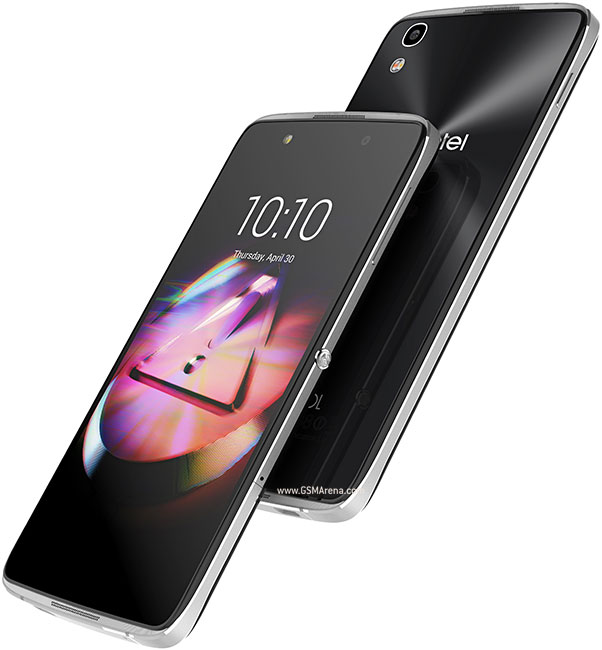
Alcatel Idol 4 6055K Android 6 0 1 Marshmallow Firmware Free

Alcatel Idol 4 6055K Android 6 0 1 Marshmallow Firmware Free


Alcatel Idol 4 6055K Android 6.0.1 Marshmallow Firmware Flash File

Alcatel Idol 4 6055K Android 6.0.1 Marshmallow Firmware Flash File

First step for Installing Rom 

  1. Download and install QPST 2.7.422 with QFIL
  2. Download and install Qualcomm USB Drivers.

How To Flash ROM Alcatel Idol 4 6055K

  1. Run QFIL.
  2. In any other case u have to install drivers manually.
  3. Qualcomm HS-USB QDLoader 9008 (COMXX)
  4. There should be device called in device management:
  5. Turn off the phone. Hold Vol+ button and plug-in USB Cable. Phone will vibrate one time, screen wil be black. This is DownloadMode.
  6. Download and install QPST 2.7.422 with QFIL and Qualcomm USB Drivers.
  7. Click Browse� in Programmer Path and choose prog_emmc_firehose_8916.mbn
  8. Load XML in Download Section:
  9. First select RawProgram File: rawprogram0.xml
  10. then Select Patch File: patch0.xml
  11. Check all inputs is correct and click Download under Load XML button and wait about 5 to 10 minutes:
  12. After flashing process starts and might take up to 5-10 minutes. So keep patience and wait
  13. See detailed Instruction Qualcomm flashing  QPST tool with images
Download Link
download file now

Read more »

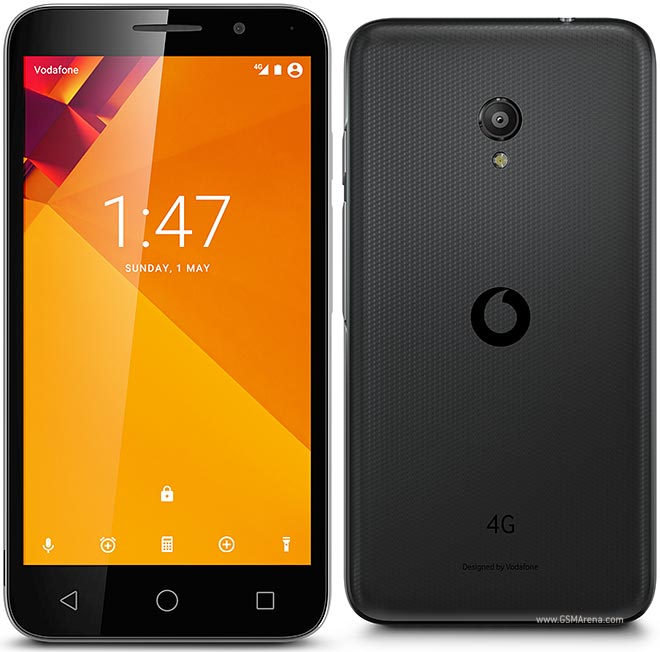
Vodafone Smart Turbo 7 VFD 500 Android 6 0 Firmware Free

Vodafone Smart Turbo 7 VFD 500 Android 6 0 Firmware Free


Vodafone Smart Turbo 7 VFD-500 Android 6.0 Firmware Flash File

Vodafone Smart Turbo 7 VFD-500 Android 6.0 Firmware Flash File

First step to Install Firmware  

  1. Download and install MTK  Android USB drivers
  2. Download And Install SP Flash Tool

How To Flash Vodafone Smart Turbo 7 VFD-500

  1. First, you need to download and install SP flash tool
  2. Download and install MTK  Android USB drivers
  3. Then download Firmware file/Flash file/ROM for your phone
  4. Your phone must have 50 % charging before this process,
  5. switch off your mobile remove the battery (if removable) reinsert the battery and plug the USB cable in charging socket
  6. Now open SP flash tool.exe
  7. When SP flash tool open, go to download button in SP flash tool
  8. In download tab, click on scatter load button
  9. After locating the scatter tab, click on the download button
  10. Now connect your smartphone with a USB cable and press volume up or volume down key for easy detection (remove and re-insert your phone battery if it is removable)
  11. Now flashing is completed, a green ring will appear in SP flash tool
  12. Close SP flash tool on your computer and unplug phone
  13. Power on the phone and enjoy
  14. After flashing process, starts, it might take up to 5-10 minutes. So, keep patience and wait.
  15. See detailed Instruction MT flashing SP tool with images


download file now

Read more »

Wednesday, September 27, 2017

Installing TWRP Root unlock Samsung Galaxy A5 6 SM A510F 2016 6 0 1

Installing TWRP Root unlock Samsung Galaxy A5 6 SM A510F 2016 6 0 1


Preparation:
  1. Make sure your phone battery is charged to 70% or more
  2. Make sure you install the Samsung Drives on your PC, if you haven�t already.
  3. Backup your device data
  4. Download twrp_3.0.0-0_sm-a510 for 6.0.1 and SuperUser
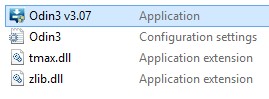
  5. Download and Unzip Odin3 (3.10.7)
  6. Unlock new method by Z3X


How To Installing TWRP and Root Samsung Galaxy A5 SM-A510F (2016)
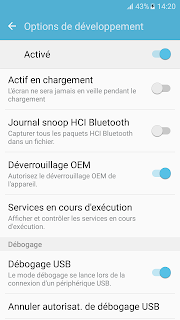
  1. First you should enabled Developer options
    If Developers Option is hidden, go to Settings > About Phone > Built Number (tap on it for 5-8 times) 
  2. Enabled USB Debugging and OEM unlock
  • Connect it to you PC using the USB cable and copy the SuperSU.zip file into the root directory of your internal storage.
  • Turn off your Samsung Galaxy
  • Boot the device into Download Mode as follows: press and hold Volume Down, Home and Power buttons together
  • When a warning triangle appears on screen, press Volume Up button to enter Download Mode.
  • Launch Odin3.exe by click right and run as administrator on computer

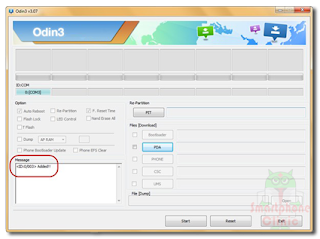
Connect your phone to the computer. Odin will automatically detect your phone and show the �added message�.


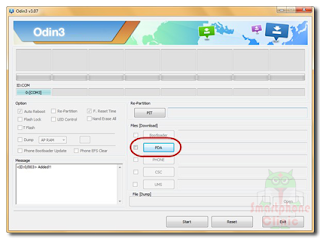
In Odin, tap AP button and find the TWRP Recovery file you downloaded earlier and select it


  • Ensure Uncheck Auto-reboot in Odin
  • click Start in Odin.
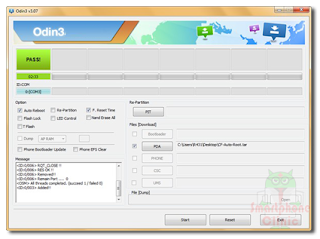
  • Once the root installation is done, your phone will reboot and soon a PASS message with a green background appears in the left-most box at the very top of Odin

  • Turn off your Samsung Galaxy
  • Boot into �recovery mode�, by pressing and hold Volume Up + Home +Power buttons simultaneously
  • Select �Install� and scroll all the way to the bottom till you see the SuperSU.zip file.
  • Select the .zip file and swipe the bar to confirm. This will start flashing the .zip file.
  • Once the flashing finished you will see the �Reboot System� option, click it to reboot your device.
  • After reboot, Open menu. If the SuperSU App exist on your Application Menu on your smartphone it means you�ve succesfully rooted your device. 
  •  
  • Now Unlock Your Phone using Z3X 


download file now

Read more »

ZenFone 6 Rooted System img file

ZenFone 6 Rooted System img file


Asus ZenFone 6 Pre rooted image file. This System.img file is build from latest 2.22.40.44 WW version. Its clean and Neat, All application present no removed application.  All files is odex aditional with supersu.apk and binary we inject the super deamon su for Stability of Root.

Requirmetnts :

Asus Zenfone 6 Version 2.22.40.44 .

The build is System.img only so your system is required to match the build version to system.img file
If you came from lower Version Then  you need to flash Boot.img fastboot.img recovery.img and other BIN files

Thsi is A test version because i dont have an Asus ZenFone 6  So please Comment below .
For manual Flash Follow this Command

fastboot flash system.img

 Download Links :
https://drive.google.com/file/d/0B8Vlzc8R44GiOWJrbGJYUDJqT2M/view?usp=sharing
Thanks..

download file now

Read more »

Tuesday, September 26, 2017

Download Official Samsung Galaxy S5 SM G900F Android 6 0 1 Marshmallow Firmware

Download Official Samsung Galaxy S5 SM G900F Android 6 0 1 Marshmallow Firmware


�� This is the official released android 6.0.1 Marshmallow Firmware update for the Samsung Galaxy SM-G900F. Do not try to install this stock Rom on any other Android device. This is the latest Official Rom available at the moment, you can easily upgrade your phone and start enjoying the android 6.0 features by flashing with Odin if the OTA update is not yet available in your region or you can't wait.
Read more �

download file now

Read more »

Monday, September 25, 2017

BOOKS OF BLOOD VOLUME 1 TO 6

BOOKS OF BLOOD VOLUME 1 TO 6


Books of Blood are a series of horror fiction collections written by the British author Clive Barker.


There are six books in total; each simply subtitled Volume 1 through to Volume 6, each volume contains four or five stories. They were published between 1984 and 1985. With the publication of the first volume, Barker became an overnight sensation and was hailed by Stephen King as "the future of horror". The book won both the British and World Fantasy Awards.


Although undoubtedly horror stories, like most of Barkers work they mix fantasy themes in as well. The tales invariably take place in a contemporary setting, usually featuring everyday people who become embroiled in terrifying or mysterious events. Barker has stated in Faces of Fear that an inspiration for The Books of Blood was when he read Dark Forces in the early 1980s and realized that a horror story collection need not have any narrow themes, consistent tone or restrictions. The stories could range from the humorous to the truly horrific.


Click here to download the complete collection of books in PDF format.

download file now

Read more »

Nokia Care Suite 5 6 134 1513 Download Here

Nokia Care Suite 5 6 134 1513 Download Here


Nokia Care Suite 5.6.134.1513 is a free and official flash tool for Nokia Asha and Lumia (windows) phones.Nokia Care Suite 5.6 include 5 tools : Fuse, Multi IMEI Reader, Multi Software Updater 5, Product Support Tool For Store 5 and Troubleshooting.Product Support Tool For Store 5 flash Supported models list :

RM-761 (Nokia Asha 200)
RM-763 (Nokia Ahsa 303)
RM-781 (Nokia Asha 300)
RM-799 (Nokia Asha 201)
RM-800 (Nokia Ahsa 201)
RM-813 (Nokia Asha 302)
RM-884 (Nokia Asha 302)
RM-803 (Nokia Lumia 710)
RM-809 (Nokia Lumia 710)
RM-807 (Nokia 808 PureView)
RM-832 (Nokia Asha 203)
RM-834 (Nokia Ahsa 202)
RM-810 (Nokia 111)
RM-811 (Nokia 111)
RM-827 (Nokia RM-827)
RM-837 (Nokia 112)
RM-871 (Nokia 113)
RM-808 (Nokia Lumia 900)
RM-823 (Nokia Lumia 900)
RM-802 (Nokia Lumia 800C)
RM-835 (Nokia Lumia 610)
RM-836 (Nokia Lumia 610)
RM-849 (Nokia Lumia 610)
RM-724 (Nokia C2-05)
RM-725 (Nokia C2-05)
RM-819 (Nokia RM-819)
RM-801 (Nokia Lumia 800)
RM-596 (Nokia N8-00)
RM-601 (Nokia C6-01)
RM-609 (Nokia E6-00)
RM-626 (Nokia N7-00)
RM-639 (Nokia X3-02)
RM-640 (Nokia C3-01)
RM-659 (Nokia X7-00.1)
RM-662 (Nokia C3-01)
RM-670 (Nokia 700)
RM-675 (Nokia C7-00)
RM-679 (Nokia T7-00)
RM-691 (Nokia T7-00.1)
RM-692 (Nokia C2-02)
RM-693 (Nokia C2-02.1)
RM-694 (Nokia X2-02)
RM-702 (Nokia C2-03/C2-07/C2-08)
RM-704 (Nokia C2-00)
RM-707 (Nokia X7-00)
RM-718 (Nokia X6-01)
RM-730 (Nokia 702T)
RM-749 (Nokia Oro)
RM-750 (Nokia 500)
RM-754 (Nokia 801T)
RM-772 (Nokia X2-05)
RM-774 (Nokia 701)
RM-775 (Nokia X3-02i)
RM-776 (Nokia C3-01i)
RM-779 (Nokia N603)
RM-766 (Nokia Asha 305)
RM-767 (Nokia Asha 306)
RM-768 (Nokia Asha 306)
RM-696 (Nokia N9)
RM-714 (Nokia Asha 311)
RM-872 (Nokia Asha 206)
RM-873 (Nokia Asha 206)
RM-862 (Nokia Asha 205)
RM-863 (Nokia Asha 205)
RM-864 (Nokia Asha 205)
RM-824 (Nokia Asha 820)
RM-825 (Nokia Asha 820)
RM-826 (Nokia Asha 820)
RM-845 (Nokia Asha 822)
RM-867 (Nokia Asha 920T)
RM-846 (Nokia Asha 620)
RM-852 (Nokia Asha 308)
RM-821 (Nokia Asha 920)
RM-822 (Nokia Asha 920)
RM-889 (Nokia Asha 510)
RM-898 (Nokia Asha 510)
RM-907 (Nokia RM-907)
RM-878 (Nokia Lumia 810)
RM-838 (Nokia Asha 308)
RM-843 (Nokia Asha 309)
RM-911 (Nokia Asha 310)
RM-913 (Nokia Asha 913)
RM-914 (Nokia Lumia 520)
RM-915 (Nokia RM-915)
RM-917 (Nokia Lumia 521)
RM-923 (Nokia Lumia 505)
RM-885 (Nokia Lumia 720)
RM-887 (Nokia Lumia 720T)
RM-860 (Nokia Lumia 928)
RM-921 (Nokia Ahsa 502 Dual SIM)
RM-839 (Nokia 301)
RM-840 (Nokia 301)
RM-841 (Nokia 301)
RM-924 (Nokia Ahsa 210 Dual SIM)
RM-925 (Nokia Ahsa 210)
RM-926 (Nokia Ahsa 210)
RM-928 (Nokia Ahsa 210 Dual SIM)
RM-929 (Nokia Ahsa 210)
RM-899 (Nokia Ahsa 501)
RM-902 (Nokia Ahsa 501)
RM-900 (Nokia Ahsa 501)
RM-892 (Nokia Lumia 925)
RM-893 (Nokia Lumia 925)
RM-910 (Nokia Lumia 925)
RM-941 (Nokia Lumia 625)
RM-942 (Nokia Lumia 625)
RM-943 (Nokia Lumia 625)
RM-927 (Nokia Lumia Icon)
RM-875 (Nokia Lumia 1020)
RM-876 (Nokia Lumia 1020)
RM-877 (Nokia Lumia 1020)
RM-952 (Nokia 515 Dual SIM)
RM-953 (Nokia 515)
RM-944 (Nokia 108 Dual SIM)
RM-945 (Nokia 108)
RM-948 (Nokia 208)
RM-949 (Nokia 208)
RM-950 (Nokia 208)
RM-956 (Nokia 208)
RM-957 (Nokia 208)
RM-954 (Nokia 207)
RM-955 (Nokia RM-955)
RM-951 (Nokia RM-951)
RM-961 (Nokia 107 Dual SIM)
RM-962 (Nokia 106)
RM-963 (Nokia 106)
RM-920 (Nokia Asha 503)
RM-922 (Nokia Asha 503 Dual SIM)
RM-947 (Nokia Asha 503)
RM-958 (Nokia Asha 503 Dual SIM)
RM-959 (Nokia Asha 503)
RM-934 (Nokia Asha 500 Dual SIM)
RM-994 (Nokia Lumia 1320)
RM-995 (Nokia Lumia 1320)
RM-996 (Nokia Lumia 1320)
RM-997 (Nokia Lumia 526)
RM-998 (Nokia Lumia 525)
RX-113 (Nokia Lumia 2520)
RX-114 (Nokia Lumia 2520)
RM-972 (Nokia Asha 500 Dual SIM)
RM-973 (Nokia Asha 500)
RM-986 (Nokia Asha 230)
RM-987 (Nokia Asha 230)
RM-969 (Nokia 220)
RM-970 (Nokia 220)
RM-971 (Nokia 220)
RM-980 (Nokia X)
RM-1011 (Nokia 225 Dual SIM)
RM-1012 (Nokia 225)
RM-1043 (Nokia 225 Dual SIM)
RM-981 (Nokia X)
RM-1053 (Nokia X+)
RM-1030 (Nokia XL)
RM-1042 (Nokia XL)
RM-894 (Nokia RM-894)
RM-1013 (Nokia X2 Dual SIM)
RM-1061 (Nokia RM-1061)
RM-1048 (Nokia RM-1048)
RM-1120 (Nokia 1050)
RM-1121 (Nokia 106)
RM-1122 (Nokia RM-120)
RM-1124 (Nokia 108 Dual SIM)
RM-1125 (Nokia 220 Dual SIM)
RM-1126 (Nokia 225 Dual SIM)

Instructions...!!

How to Flash Nokia Asha and Lumia Mobile Phones Without Box?

1. Extract the "Nokia Care Suite 5.6.134.1513" .RAR file.
2. If you already installed Nokia lumia and MTK USB Driver, Just install Nokia Care Suite 5.6.134.1513 Setup Only, Otherwise install Nokia Care Suite 5.6.134.1513 Full Setup file.
3. After Installation Open "Application Launcher" App from this path "C:Program Files (x86)NokiaNokia Care SuiteApplication Launcher in"
4. Double Click on "Product Support Tool For Store 5", After Run Tool "Product Support Tool For Store" Click on Work Offline.
5. Click on "File" and click "Open Product".
6. Select Mobile type or Model and click "Open".
7. Paste flash file to this Directory "C:ProgramDataNokiaPackagesProducts" you want to flash.E.X : I want to flash/Unlock Nokia Lumia 610 RM-835 without Box.I Create a new folder "RM-835" to this directory and paste all nokia lumia 610 flash files here.If you need to download Nokia firmware flash use this tool "Nokia Firmware Suite v4.1".
8. Open Product Support Tool For Store tool and click on "> Programming" and select Recovery.Click on "Start".
9. Power Off the device, Remove battery, Re-insert battery back and Insert USB cable while pressing "Volume UP" button.
10. If you face flash error click on retry.
11. Flash 100% Done
If You Encountered Any Problem, Feel Free To Ask Just Leave A Comment And I Will Answer It As Soon As I Can. If You Find This Blog Helpful Please Share It To Your Friends And Don�t Forget To Like Our Facebook Page,


 Nokia Care Suite 5.6.134.1513 Download Here
...


download file now

Read more »

SONY Media APPS for ASUS Zenfones 4 5 6 JellyBean KitKat Lollipop Firmwares SKU CHT WW TW

SONY Media APPS for ASUS Zenfones 4 5 6 JellyBean KitKat Lollipop Firmwares SKU CHT WW TW


Hello Everyone..In this Post I am sharing you the Sony Media Apps Installer for our Asus Zenfones 4/5/6 For JellBean/KitKat/Lollipop Firmwares SKU - CHT WW TW

SONY Walkman Movies Album ViPER4Android+Kernel

Download this Rar File

Walkman Features - Material Design,surroundpcm mod,alac,auto color change,widget
due to Architecture Limitation I cant port the SoundEffectsManager as it collapses with our WavesMaxX Audio Engine :-(

Album - Material Design,xReality and BraviaEngine Added :-D


INSTALLATION

This Process Needs ROOT

Zenfone 5 Lollipop Users Please Read this Thread to Root Your Firmware

Once You Downloaded ..Extract it To a Folder

Password : zenfone-five.blogspot.com

Run test.bat Which you can find inside the Extracted folder

test.bat


Follow the Instruction Given


Installation Takes Few Minutes..

This Installation Package Contains - Walkman,Album,Movies Material Designed with ViPER4Android along with its IRS Kernel which you can use it for Awesome Sound Experience by Toggling UI setting to Advanced Mode


This Walkman Will Change your Screen Color Based on the Album Cover..This is not the One which is Available for all..

Please Install BusyBox before Installing VIPER Driver..Just Search BusyBox in Playstore 


SomeTimes the Viper May not Process the Audio.So Open it and Swipe it from the Recents and it will Process automatically..You can Check that

ScreenShots: With Lollipop Firmware + Rooted


Hit Like & +1 if You Like My Work and Share this Post for all Zenfone users

Follow My Blog to get more Mods,Patches,Tutorials


download file now

Read more »

Sunday, September 24, 2017

Intex Aqua Costa MT6580 Android 6 0 Firmware Free

Intex Aqua Costa MT6580 Android 6 0 Firmware Free


Intex Aqua Costa MT6580 Android 6.0 Firmware Flash File

Intex Aqua Costa MT6580 Android 6.0 Firmware Flash File

First step to Install Firmware

  1. Download and install MTK  Android USB drivers
  2. Download And Install SP Flash Tool

How To Flash Intex Aqua Costa  

  1. First, you need to download and install sp flash tool
  2. Download and install MTK  Android USB drivers
  3. Then download Firmware file/Flash file/ROM for your phone
  4. Your phone must have 50 % charging before this process
  5. switch off your mobile remove the battery (if removable) reinsert the battery and plug the USB cable in charging socket
  6. Now open SPflash tool.exe
  7. When sp flash tool open, go to download button in sp flash tool
  8. In download tab, click on scatter load button
  9. After locating the scatter tab, click on the download button
  10. Now connect your smartphone with a USB cable and press volume up or volume down key for easy detection (remove and re-insert your phone battery if it is removable)
  11. Now flashing is completed, a green ring will appear in sp flash tool
  12. Close sp flash tool on your computer and unplug phone
  13. Power on the phone and enjoy
  14. After flashing process starts, it might take up to 5-10 minutes. So keep patience and wait.
  15. See detailed Instruction MT flashing sp tool with images


Download Link

download file now

Read more »

Saturday, September 23, 2017

Download latest Android Marshmallow 6 0 stock firmware for Vernee Thor

Download latest Android Marshmallow 6 0 stock firmware for Vernee Thor


Ive already posted this on my forum page. But, still Ill share it on Shubhams Stock.

Download Cricket 07 Weather Icons:


Password:

easportstcb


Installation:

Copy all the files to your EA Cricket 07 root directory.

e.g. - C:Program FilesEA Sports Cricket 07


Download

download file now

Read more »

How to Download and Install AICP Marshmallow 6 0 1 on LeTV LeEco 1s X500 X507 X509 Without Bugs

How to Download and Install AICP Marshmallow 6 0 1 on LeTV LeEco 1s X500 X507 X509 Without Bugs


So how to Download Android 6.0.1 Marshmallow AICP Android 6.0.1 ROM For LeTV 1S X500? How to Install AICP Android 6.0.1 ROM on LeTV 1S X500,X507,X509,? Let�s check out this post for more!

Good news for all LeTV 1S X500 Users! The LeTV 1S X500 got it official AICP Android 6.0.1 OS update today! This update comes with lots new features and improvements. It also comes with optimized battery life than before and gives you the latest version of Android 6.0.1 This post is all about How to Download and Install AICP Android 6.0.1 ROM on LeTV 1S X500.

Just follow the below guide or steps on How to Install AICP Android 6.0.1 ROM on LeTV 1S X500. The AICP Android 6.0.1 ROM is similar to Android 6.0.1 Marshmallow and just follow the simple instruction to download and Install AICP Android 6.0.1 ROM for LeTV 1S X500 (Android 6.0.1 Marshmallow). Also for this method, we gonna use TWRP Recovery to flash the custom ROM in no time.

What is AICP Android 6.0.1 OS?

This amazing AICP custom ROM comes with tons of new features and is based on Android 6.0.1Nougat.
AICP is known by everyone as Ice Cold Project that started on Desire HD and since then evolved into a mature ROM with the BEST community you can find!!!

Until Lollipop, Rom has always been AOKP based. Unfortunately, since AOKP either stopped development or will make a comeback later this year, we changed our base to CM when it comes to hardware, drivers, and some features.
Download & Install AICP Android 6.0.1 ROM On LeTV 1S X500,X507,X509,

So here what we gonna do to Install AICP Android 6.0.1 ROM on LeTV 1S X500, X507, X509,. It�s just like installing custom ROM on your devices. The only difference, here you will installing Gapps additional to ensure that you use apps from Google Play store. Let�s check it How to Download and Install AICP Android 6.0.1 ROM On LeTV 1S X500, X507, X509

Things works fine with this update,( No Major Bugs )

         Fingerprint

         NFC

         Wi-Fi

         Bluetooth

         LTE

         Camera (front and rear)

         Flash

         Microphone

         Speaker

Prerequisites

         Requires Root Access and latest TWRP Recovery.

         Your device must have 50-60% charged.

         Take a full backup of your data.

         The Custom ROM shared here only works on LeTV 1S X500.

Download AICP Android 6.0.1 OS ROM Files for LeTV 1S X500,X507,X509,

Custom ROMs for LeTV 1S X500,X507,X509,

Download Links

AICP Android 6.0.1 ROM File

Link

Download Gapps

Link

How to Install AICP Android 6.0.1 ROM on LeTV 1S X500, X507, X509, Officially?

         First, you need to download the AICP Android 6.0.1 for your device from above. Also, you need to download Android 6.0.1 Compatible Gapps for LeTV 1S X500 devices.

         Once you download, move the files to internal storage of your device.

         Reboot your device intro TWRP recovery. You can enter this mode by Pressing & holding Volume Down + Power Button together for a while.

         In TWRP, tap Backup and create a Nandroid backup.

         Then Select Wipe > Advanced Wipe > Clear Data, Cache, and System.

         Tap on �Install� then locate the AICP Android 6.0.1 ROM Zip file.

         Start the installation of the ROM by swiping to the right side.

         Once the installation was done, flash the Gapps Zip file on your LeTV 1S X500 device.

         Select Wipe > Wipe Cache > Dalvik Cache.

         Reboot your device and enjoy!

ScreenShot
Image result for aicp rom
Hope you have successfully installed AICP Android 6.0.1 and know how to Install AICP Android 6.0.1 ROM on LeTV 1S X500, X507, X509, Officially. If you are facing any issues while installation process, leave it in the comment section to get help.

Stay tuned for more updates!

Video Guide

download file now

Read more »